Intel Media Transport Library (MTL) for ST 2110: Software-Based Media Transport with FFmpeg and OBS
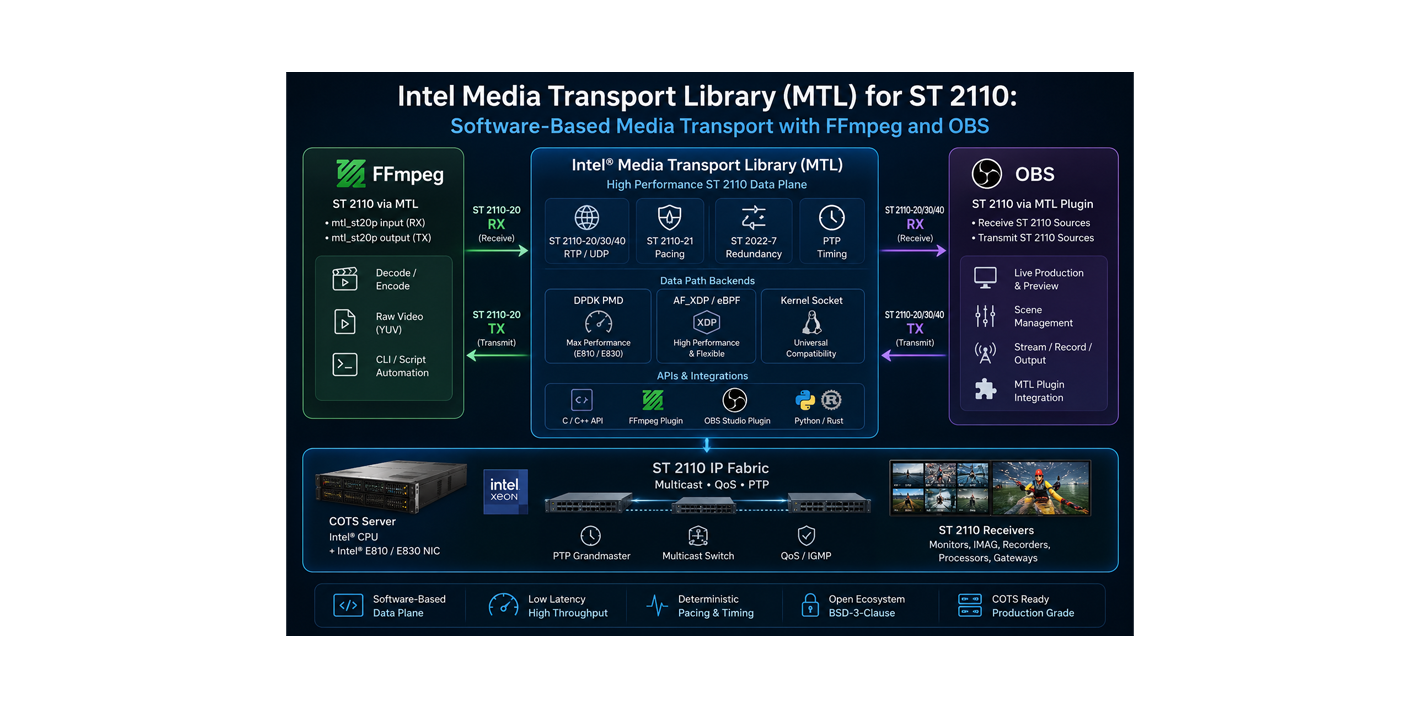
Intel Media Transport Library (MTL) for ST 2110: Software-Based Media Transport with FFmpeg and OBS
Summary
- Intel Media Transport Library (MTL): a software data-plane library for ST 2110-compliant media transport on COTS servers
- Core problem: uncompressed streams such as ST 2110-20 have strict packet pacing, PTP timing, jitter, throughput, and packet loss requirements
- MTL approach: user-space packet processing and low-latency RTP/UDP media transport using DPDK PMD, AF_XDP, or kernel socket backends
- FFmpeg integration: the MTL plugin adds an
mtl_st20pinput/output device to FFmpeg, allowing direct ST 2110-20 raw video receive/transmit - OBS integration: the MTL ecosystem includes OBS Studio plugin support, allowing OBS-based production/test workflows to connect to ST 2110 environments
- Positioning: MTL is not an NMOS control plane; it is the ST 2110 media packet TX/RX data-plane layer
Note: This article complements the data-plane side of ST 2110 campus, NMOS, MXL, and FFmpeg/GStreamer. The goal is to explain MTL not as a media application, but as a software media transport layer for ST 2110.
1. Why is ST 2110 hard in software?
ST 2110 can look simple at first: RTP packets, multicast, video/audio/data flows. The difficult part is making those flows behave like broadcast-grade real-time signals.
Especially for ST 2110-20 uncompressed video:
- bandwidth is high
- packets must leave at controlled intervals
- ST 2110-21 pacing behavior matters
- streams must stay aligned to PTP time
- multicast networks have limited tolerance for drops and jitter
- CPU, memory, NIC, and PCIe paths must work together
Generating or receiving high-bitrate ST 2110 with the classic Linux kernel network stack may work in some cases, but deterministic pacing and low jitter often require more control. This is why FPGA, SmartNIC, or dedicated hardware solutions have historically been common in broadcast ST 2110 systems.
Intel MTL starts from this claim: ST 2110 transport can be implemented with COTS servers + suitable NICs + optimized software data planes.
2. What is Intel MTL?
Media Transport Library (MTL) is a software-based real-time media transport library in the Intel/OpenVisualCloud ecosystem. Its goal is to transmit and receive ST 2110-compliant media streams over managed IP networks with high throughput and low latency.
Important MTL capabilities include:
- DPDK PMD backend
- AF_XDP + eBPF backend
- kernel socket backend
- user-space LibOS UDP stack
- PTP hardware timestamp offload
- ST 2110-20 video, ST 2110-30 audio, ST 2110-40 ANC
- ST 2110-21 pacing
- ST 2022-7 redundancy
- ST 2110-22 plugin interface
- FFmpeg plugin
- OBS Studio plugin
- Python/Rust bindings and native C/C++ API
- license: BSD-3-Clause
The key distinction in this diagram: MTL is not the media application. FFmpeg, OBS, or a custom app produces/consumes media; MTL handles the ST 2110-compliant packet transport.
2.1 NIC support: why E810/E830 matter
MTL keeps Ethernet support broad through three backends: DPDK PMD, AF_XDP, and kernel socket. In practice, not every NIC delivers the same ST 2110 behavior.
The important distinction in Intel’s documentation is:
- daily development and validation primarily happen on Intel E810 and Intel E830 series cards
- other DPDK-supported NICs may work, but their status is not guaranteed at the same level
- narrow pacing TX specifically depends on the E810/E830 + DPDK PMD combination because of rate-limit support; other paths generally rely on TSC-based pacing and are closer to wide/broad pacing
- for E810, ICE driver/DDP package and firmware versions can be critical
- older or different Intel NICs such as X710/CVL can appear in tests/benchmarks, but E810/E830 are the safer starting point for current ST 2110 narrow pacing goals
So “we have an Intel NIC” is not enough for a production POC. Clarify these points early:
| Question | Why it matters |
|---|---|
| Is the NIC E810/E830? | Safest starting point for narrow pacing and current validation |
| Which driver/firmware/DDP package? | ICE-based NICs are sensitive to feature and stability changes |
| Which NUMA node owns the NIC? | Critical for CPU pinning and memory locality |
| Is PCIe bandwidth sufficient? | Can bottleneck 4K/8K or many-flow setups |
| Will SR-IOV/VFs be used? | Changes data-path behavior in VM/container architectures |
2.2 How to choose DPDK, AF_XDP, or kernel socket
MTL offers three major data paths, but they are not equivalent.
| Backend | When to choose | Pros | Cons |
|---|---|---|---|
| DPDK PMD | production POC, high bitrate, ST 2110-21 pacing, E810/E830 | most control, kernel bypass, narrow pacing support | NIC binding/VFIO, hugepages, NUMA/core tuning, operational complexity |
| AF_XDP | keep closer to the kernel, cloud/container experiments, less aggressive kernel bypass | XDP/eBPF ecosystem, kernel still owns the device | kernel/libbpf/libxdp requirements; performance and feature set depend on NIC/kernel |
| Kernel socket | quick trials, non-DPDK NICs, low-risk lab work | easier setup, normal NIC/IP model | limited performance, should not be treated as the strict ST 2110 timing production path |
Rule of thumb:
- High-bitrate ST 2110-20 TX/RX and production POCs: start with E810/E830 + DPDK PMD.
- Labs where kernel integration matters: evaluate AF_XDP.
- Concept proof or NIC incompatibility: use kernel socket fallback.
2.3 System requirements: there is no universal minimum
It would be misleading to say “this CPU is enough” for MTL. A single 1080p50 flow, many 4K flows, and 8K workflows are completely different. Intel’s compliance/benchmark documentation shows reference platforms such as dual-socket Intel Xeon Platinum 8358, 64 cores, 512 GB RAM, and 100G NICs. That is not a universal minimum; it is a measured reference system.
As a practical starting point, a single 1080i50/1080p50 ST 2110-20 flow can be a reasonable lab target for a modern 8-core server, an Intel E810/E830-class NIC, correct driver/firmware/DDP package, hugepages, and a few isolated CPU cores. But this should not be read as a production capacity guarantee; adding a second flow, 4K, ST 2022-7, or encode/decode makes measurement mandatory.
Practical starting checklist:
| Area | Starting point |
|---|---|
| CPU | enough physical cores for pinning; separate RX/TX, app, and housekeeping cores |
| NUMA | keep NIC, memory, and worker cores on the same NUMA node |
| Memory | hugepages are required/practically needed; even kernel socket backend still uses hugepages |
| Kernel | modern Linux + libbpf/libxdp for AF_XDP; supported kernel/IOMMU/VFIO for DPDK |
| DPDK | follow the DPDK version and patch requirements in the MTL build guide |
| NIC | E810/E830 are the safest starting point for production POCs; pin firmware/driver/DDP versions |
| OS tuning | measure CPU governor, IRQ affinity, isolated cores, and C-state settings |
Using a COTS server does not mean “any server will do.” COTS only works here with the right NIC, CPU/NUMA placement, and network tuning.
3. Where does MTL sit in the ST 2110 chain?
It is useful to split an ST 2110 system into three planes:
| Plane | Example technology | Responsibility |
|---|---|---|
| Media data plane | MTL, FPGA gateway, hardware NIC stack | RTP packet TX/RX, pacing, timestamping, throughput |
| Control plane | NMOS IS-04/IS-05/IS-06 | discovery, registration, connection management |
| Application plane | FFmpeg, OBS, playout, mixer, analyzer | video/audio generation, processing, encode/decode |
MTL belongs to the media data plane.
So MTL answers this question:
How do I send and receive these raw video/audio frames as ST 2110 packets at the correct rate, timing, and NIC path?
It does not directly answer:
- How do devices discover each other? → NMOS IS-04
- Which sender connects to which receiver? → NMOS IS-05 / orchestration
- How does the switch establish multicast flows? → IS-06 / SDN
- How is the production graph managed? → control/orchestration layer
4. FFmpeg output with MTL: mtl_st20p
One of the most practical integrations in the MTL ecosystem is the FFmpeg plugin. It adds an input/output device for ST 2110-20 progressive/raw video:
|
|
This means:
- FFmpeg can read an ST 2110-20 stream as input
- FFmpeg can transmit raw video frames as ST 2110-20 output
- it can be combined with decode/filter/encode/remux operations inside an FFmpeg pipeline
Critical warning: this is not a standard feature in
apt install ffmpeg, Homebrew FFmpeg, or a normal upstream FFmpeg build. The MTL documentation describes an FFmpeg build with MTL patches and--enable-mtl. A production runbook should clearly record which FFmpeg binary, MTL release, commit/tag, and build flags were used.
4.1 Receiving ST 2110-20 with FFmpeg
Conceptual example:
|
|
Here FFmpeg receives ST 2110-20 video through the MTL device and encodes it to H.264 in the example. In real deployments, codec, pixel format, NIC PCI address, multicast IP, port, and payload type depend on the environment.
4.2 Transmitting ST 2110-20 with FFmpeg
Conceptual output chain:
|
|
This model is useful for:
- sending a test pattern or file source into an ST 2110 fabric
- prototyping software playout
- building ST 2110 receivers/analyzers
- producing ST 2110 output from cloud/edge nodes
- emulating a camera or gateway in a lab
4.3 Why the FFmpeg plugin matters
FFmpeg is already a daily tool for broadcast engineers. With the MTL plugin, FFmpeg can become:
- an ST 2110 test sender
- an ST 2110 receiver + transcoder
- a file-to-ST 2110 bridge
- an ST 2110-to-file recorder
- an ST 2110-to-HLS/SRT gateway prototype
This makes software-based ST 2110 labs easier to build without waiting for dedicated hardware. But production use still requires careful validation of timing compliance, NIC selection, and release tags.
5. OBS Studio and MTL support
The MTL documentation also lists OBS Studio plugin support as part of the ecosystem. This is interesting because OBS is usually associated with RTMP/SRT/NDI/screen-capture workflows rather than professional ST 2110.
With the MTL plugin, OBS can be explored as a software source or production tool in ST 2110 workflows.
OBS + MTL can make sense for:
- sending an OBS scene into an ST 2110 lab
- moving graphics, browser sources, or screen capture into an ST 2110 fabric
- demonstrating software-defined production in training/demo environments
- quickly producing sources for broadcast testing
- connecting OBS composition to an MTL/FFmpeg-based ST 2110 output chain
This must be positioned carefully: OBS + MTL is not automatically a mature replacement for a broadcast production switcher. It is an interesting bridge for software-based production, labs, tests, demos, and specific graphics/source workflows.
Before moving toward production, also check:
- which MTL release the OBS plugin was tested with
- whether the plugin is actively maintained and when the last commit/release happened
- OBS version, plugin ABI, and operating system compatibility
- how audio/video sync and PTP relationship are validated
- whether OBS, the plugin, or the MTL process is restarted after a failure
6. How should MTL, MXL, FFmpeg, and NMOS be understood together?
Connecting this to earlier articles:
| Component | Responsibility |
|---|---|
| MTL | ST 2110 packet transport data plane |
| FFmpeg | media decode/filter/encode and ST 2110 I/O through the MTL device |
| OBS | software scene/source generation, connected to ST 2110 through the MTL plugin |
| MXL | exchange between media functions inside a compute cluster |
| NMOS | discovery, registration, connection management |
| PTP | shared timing foundation |
A software-defined broadcast node may look like this:
MTL and MXL should not be confused:
- MTL: ST 2110 RTP packet transport at the network edge
- MXL: media exchange inside compute
They can complement each other in the same architecture.
7. What about audio?
In ST 2110, video and audio are not carried in the same stream. What traveled together in SDI is split into separate essence flows in IP:
- video: ST 2110-20
- audio: ST 2110-30 (PCM audio) or ST 2110-31 (AES3 transparent)
- ancillary data: ST 2110-40
So with MTL/FFmpeg, do not assume “I sent video, therefore audio is included.” Video uses mtl_st20p; audio needs a separate ST 2110-30 flow.
The MTL FFmpeg plugin includes mtl_st30p support for audio. The documented model looks like this:
7.1 Receiving ST 2110-30 audio
Example: receive a 2-channel, PCM24, 1 ms packet-time ST 2110-30 stream and write it to a WAV file:
|
|
7.2 Sending ST 2110-30 audio
Example: loop a WAV file and send it as ST 2110-30 audio multicast:
|
|
For PCM16, the plugin can use the mtl_st30p_pcm16 muxer; on demux, set pcm_fmt pcm16.
7.3 Critical audio design points
| Topic | Why it matters |
|---|---|
| Sampling rate | Broadcast audio is usually 48 kHz; wrong rates create sync problems |
| Channel count | Stereo, 5.1, 8/16-channel mapping must match the receiver |
| Packet time | 1 ms is common; it affects latency and packet rate |
| Payload type | Must match SDP/NMOS and receiver expectations |
| PTP alignment | Video and audio are separate streams, so a shared time base is mandatory |
| Stream mapping | Video multicast IP/port and audio multicast IP/port are managed separately |
| Monitoring | “Do we have audio?” must be checked at channel mapping and audio level, not only packet level |
In real systems, video and audio flows are usually managed together through SDP/NMOS metadata. MTL provides packet transport; the relationship between a video flow and its audio flow belongs to the control/orchestration layer.
7.4 What about ST 2110-40 ANC?
ST 2110-40 carries the ancillary data world: timecode, captions, AFD, SCTE-104-like data, and similar payloads. MTL lists ST 2110-40 support, but the FFmpeg plugin examples are not as direct and ready-made as the ST20/ST22 video and ST30 audio examples.
In practice, ST 2110-40 should be treated like this:
- it is managed as a separate multicast IP/port/payload type, just like video and audio
- receiving ANC packets is not enough unless the payload is parsed and semantically validated
- captions/timecode must be interpreted at the application layer
- video/audio/ANC relationships should be explicit in SDP/NMOS metadata
- if you plan to use ST40 with MTL, inspect the C/C++ API and sample app ST40 sessions separately
This article gives FFmpeg examples for ST20 video and ST30 audio, while positioning ST40 as a production design checklist item. If ANC matters in your workflow, the first test should be not only packet RX/TX but caption/timecode semantic validation.
7.5 Short note on ST 2110-22 / JPEG XS
ST 2110-22 carries compressed video essence instead of uncompressed ST 2110-20. JPEG XS is one of its most important practical use cases because it targets low-latency, visually near-lossless contribution.
The MTL FFmpeg plugin includes mtl_st22 and mtl_st22p paths:
mtl_st22: transports FFmpeg codec output as compressed ST 2110-22 RTP payloadmtl_st22p: uses the MTL built-in ST22 codec plugin approach to receive/send raw frames- for JPEG XS, FFmpeg must be built with MTL and the relevant codec support such as SVT JPEG XS
Simplified JPEG XS output idea:
|
|
Leaving ST 2110-22 as just an “experiment” would be incomplete. The better positioning is: when uncompressed ST20 is too bandwidth-heavy and low-latency compressed essence is acceptable, MTL + ST22 + JPEG XS becomes a separate design topic.
This example is marked “simplified” because the command alone is not enough: FFmpeg must be built with both the MTL plugin and SVT JPEG XS codec support, and the receiver must agree on payload_type, st22_codec, frame rate, and SDP/NMOS metadata. Production tests must also measure latency, visual quality, and packet pacing separately.
8. Real-world scenarios
It is better to think about MTL through concrete workflows rather than as an abstract library.
8.1 Software playout node
A file or render output is read by FFmpeg, video is sent as ST 2110-20, and audio as ST 2110-30.
|
|
In this scenario, video/audio sync, PTP alignment, asset channel mapping, and receiver SDP/NMOS metadata must be correct.
8.2 OBS graphics source to ST 2110
OBS can be used for graphics, browser sources, screen capture, or simple compositing. With the MTL plugin or an FFmpeg handoff, it can produce a source into the ST 2110 fabric.
This is especially useful for demos, training, labs, and quick graphics source generation. It is safer to position it as a software source generator rather than a replacement for the main production switcher.
8.3 ST 2110 receiver + recorder
Video/audio is received through MTL RX, and FFmpeg writes it to file or encodes it into a proxy format.
|
|
This can be useful for compliance recording, monitoring, proxy generation, or troubleshooting.
8.4 Cloud/edge gateway
Video/audio from an ST 2110 fabric is received on a software node and converted to SRT/HLS/DASH outputs.
|
|
This scenario is useful when building a software gateway between an ST 2110 facility and OTT/cloud workflows.
8.5 Lab/test generator
Without waiting for dedicated hardware, FFmpeg + MTL can generate test signals:
- color bars or test patterns
- PCM test tone
- payload type and packet-time experiments
- receiver timing parser tests
- ST 2022-7 path tests
8.6 JPEG XS / ST 2110-22 contribution POC
When uncompressed ST 2110-20 bandwidth is too high, ST 2110-22/JPEG XS becomes a separate low-latency compressed essence test scenario.
|
|
In this workflow, the test is not only “packets are flowing.” JPEG XS encode latency, visual quality, payload type, st22_codec, SDP/NMOS metadata, and receiver compatibility must be validated together.
9. Production checklist
With MTL and ST 2110, system engineering matters as much as software.
| Area | Check |
|---|---|
| NIC | supported Intel NIC, correct driver, firmware, PCIe bandwidth |
| Backend | DPDK PMD, AF_XDP, or kernel socket? |
| CPU | core pinning, NUMA locality, isolated cores |
| Memory | hugepages, DMA, cache locality |
| PTP | SMPTE ST 2059 profile, IEEE 1588 PTPv2, grandmaster redundancy, PHC/system clock sync, hardware timestamping, offset monitoring |
| Network | multicast, IGMP/PIM, QoS, VLAN, MTU |
| ST 2110-21 | packet pacing narrow/wide compliance |
| Redundancy | path isolation if ST 2022-7 is required |
| Observability | packet loss, jitter, RX timing parser, logs, metrics |
| Release | use evaluated/release tags rather than an arbitrary main branch |
The important warning on the Intel MTL GitHub page should be remembered here: the main branch may be for testing/evaluation; evaluated code should be tracked through release tags.
The PTP row should not be read lightly. In ST 2110, “we have PTP” is not enough; grandmaster selection, BMCA behavior, boundary/transparent clock design, NIC PHC offset, ptp4l/phc2sys or MTL’s built-in PTP approach, and alarm thresholds must be validated separately. Since video and audio are separate flows, PTP errors often show up as A/V sync problems.
COTS server issues also tend to be very practical:
- CPU scheduling jitter
- wrong NUMA placement
- PCIe bandwidth or slot topology
- NIC firmware/driver/DDP mismatch
- hugepage and VFIO permissions
- noisy-neighbor effects on shared hosts
- SR-IOV and clock-sync complexity inside containers/VMs
10. Where does it fit?
I would consider MTL especially for:
- ST 2110 software playout prototypes
- ST 2110 test signal generators
- ST 2110 receivers/analyzers
- FFmpeg
mtl_st20p/mtl_st30pbased ST 2110-to-file recorders - file-to-ST 2110 lab senders, with video and audio as separate flows
- OBS scene-to-ST 2110 demo/source workflows
- edge/cloud ST 2110 gateway experiments
- JPEG XS / ST 2110-22 low-latency contribution POCs
- ST 2110-40 ANC packet transport and application-layer parsing tests
- ST 2022-7 redundancy validation
- broadcast data-plane POCs on COTS servers
Where to be careful:
- full production router replacement
- environments with weak PTP and network control
- non-deterministic shared compute hosts
- systems without standardized NIC/driver/firmware
- large campus operations without NMOS/orchestration
- environments where the FFmpeg/OBS plugin release and build chain are not pinned
A separate setup article would make sense for MTL: E810/E830 NIC preparation, DPDK binding, hugepages, patched FFmpeg builds, SVT JPEG XS, and sender/receiver tests are detailed enough to exceed the scope of this article.
11. SDP: how is an ST 2110 stream described?
MTL handles packet transport, but real ST 2110 receivers must know “what to receive.” This is usually described with SDP (Session Description Protocol), and the same metadata is also used by control planes such as NMOS IS-04/IS-05.
The rough mapping from FFmpeg/MTL parameters to SDP looks like this:
| MTL / FFmpeg parameter | SDP field | Meaning |
|---|---|---|
p_tx_ip / p_rx_ip |
c=IN IP4 ... |
multicast destination/source group |
udp_port |
m=video 20000 ... |
RTP UDP port |
payload_type |
m=... 96, a=rtpmap:96 ... |
dynamic RTP payload type |
video_size |
width, height |
frame size |
pix_fmt |
sampling, depth, colorimetry |
video sampling and color metadata |
fps / r |
a=framerate |
frame rate |
| PTP domain | ts-refclk, mediaclk |
shared timing reference |
Simplified ST 2110-20 SDP example:
|
|
ST 2110-30 audio needs its own SDP:
|
|
These are not production SDP templates; the point is to show the relationship between MTL command parameters and ST 2110 metadata. In real systems, SDP/NMOS metadata must exactly match the receiver’s pixel format, payload type, packet time, clock source, and multicast expectations.
12. ST 2110-21 pacing: narrow, narrow linear, wide
ST 2110-21 is critical for uncompressed video sender behavior. Two senders with the same average bitrate can transmit packets in very different rhythms. For the receiver, the problem is not average bitrate; it is microbursts and buffer behavior.
Simple visualization:
|
|
| Type | Meaning | Practical effect |
|---|---|---|
| Narrow | highly deterministic and tight pacing | lowers receiver buffer needs; harder for the sender |
| Narrow Linear | smoother linear pacing profile | good target for software senders; NIC pacing support matters |
| Wide | burstier sender behavior | receiver needs more buffer tolerance |
This is where Intel E810/E830 matter: narrow pacing TX depends on rate-limit/hardware pacing behavior with DPDK PMD. TSC-based software pacing can be enough in some lab scenarios, but production ST 2110-21 targets require measuring NIC pacing behavior separately.
13. Minimal lab topology
A small, correctly designed lab is more valuable for learning MTL than a large, misconfigured system.
Suggested lab progression:
- start with one ST 2110-20 video flow
- add ST 2110-30 audio
- validate SDP/NMOS metadata
- monitor PTP offset and RTP sequence loss
- then move to advanced topics such as ST 2022-7 or ST 2110-22
14. Observability and common failures
A production ST 2110 system is not left at “it works”; it is continuously measured.
What to monitor:
- RTP sequence gaps / packet loss
- packet inter-arrival jitter
- ST 2110-21 pacing behavior
- PTP offset and grandmaster changes
- NIC RX/TX drops
- DPDK ring occupancy
- CPU core utilization and scheduling jitter
- NUMA remote memory access
- audio levels and channel mapping
- SDP/NMOS metadata mismatches
Useful tools:
- Wireshark RTP/ST 2110 analysis
ptp4l/phc2syslogs- NIC driver counters
- MTL sample app logs and RX timing parser
- EBU LIST / JT-NM test methodologies
- vendor ST 2110 analyzer devices
Common failures:
| Problem | Possible cause |
|---|---|
| Black video | wrong SDP, pixel format mismatch, payload type error |
| No audio | ST30 multicast/port mismatch, channel count or payload type error |
| Audio drift | PTP sync issue, wrong sampling rate, separate video/audio clock domains |
| Packet drops | NUMA mismatch, PCIe bottleneck, NIC queue overflow |
| Burst jitter | wrong pacing mode, kernel path, CPU scheduling jitter |
| Receiver not joining | IGMP/PIM/multicast VLAN issue |
| RX overrun | CPU affinity, DPDK ring size, IRQ or core pinning issue |
| ST 2022-7 failover broken | paths are not truly independent or have excessive delay difference |
| No captions/timecode | ST40 payload arrives but the application layer does not parse it |
15. Wireshark filters mini appendix
When troubleshooting, packet-level inspection is often the first stop. The filters below are quick starting points; narrow them by interface, VLAN, and multicast design.
| Goal | Wireshark display filter |
|---|---|
| All RTP traffic | rtp |
| Video flow port | udp.port == 20000 |
| Audio flow port | udp.port == 30000 |
| PTP messages | ptp |
| Specific multicast group | ip.dst == 239.168.85.20 |
| Specific sender IP | ip.src == 192.168.96.2 |
| RTP payload type | rtp.p_type == 96 |
| Specific SSRC | rtp.ssrc == 0x12345678 |
| Inspect RTP sequence errors | rtp, then Analyze RTP Streams |
| IGMP join/leave | igmp |
Practical flow:
- start with
ptpand confirm clock messages are present - check
igmpto see whether the receiver joined the multicast group - use
udp.port == 20000orudp.port == 30000to confirm the flow arrives - use RTP stream analysis for sequence gaps and jitter
- confirm payload type, multicast IP, and UDP port match the SDP
Wireshark is not a full ST 2110 compliance analyzer, but it quickly answers: “Are packets present, is this the right flow, are sequences breaking, did the receiver join?”
16. FFmpeg + MTL build appendix
This is not a guaranteed copy-paste build recipe; versions change, so the official MTL build guide should always be followed. But a production runbook should include this checklist:
- choose an MTL release tag
- use the supported DPDK version and apply MTL patches if needed
- prepare hugepages and VFIO/IOMMU settings
- pin NIC driver/firmware/DDP package
- build FFmpeg with MTL patches and
--enable-mtl - add SVT JPEG XS codec support if ST 2110-22/JPEG XS is required
- record commit hashes, configure flags, and linked library versions for the build artifact
Example build note fields:
|
|
Without this information, reproducing the same system or doing root cause analysis after a production incident becomes much harder.
17. Version pinning checklist
Shipping random main branch builds into production is a bad idea for ST 2110 software data-plane systems.
| Component | Pin it? | Why |
|---|---|---|
| MTL release tag | ✅ | tested code level |
| DPDK version | ✅ | PMD behavior and patch compatibility |
| FFmpeg commit/build | ✅ | mtl_st20p/st30p/st22 plugin behavior |
| NIC firmware | ✅ | pacing, timestamping, driver compatibility |
| DDP package | ✅ | E810/E830 feature behavior |
| Kernel version | ✅ | AF_XDP, VFIO, timing, and driver behavior |
| PTP config | ✅ | clock domain and offset behavior |
| OBS plugin version | ✅ | ABI and stability |
If this list is missing from the production runbook, the system is not reproducible.
18. Conclusion
Intel Media Transport Library is an important data-plane project that pushes ST 2110 closer to software-defined broadcast instead of leaving it only in the dedicated-hardware world.
Short version:
FFmpeg and OBS produce or process media; MTL sends and receives that media as ST 2110-compliant RTP flows through COTS servers and NICs.
MTL should be positioned correctly:
- it is not a codec
- it is not NMOS
- it is not a broadcast router
- it is an ST 2110 data-plane library
Through the FFmpeg mtl_st20p and mtl_st30p devices, MTL connects to one of the most powerful tools broadcast engineers already use. OBS plugin support opens an interesting bridge toward software-based production workflows. The ST 2110-40 ANC and ST 2110-22/JPEG XS sections also show that MTL is not only a “raw video sender” project; video, audio, ANC, compressed essence, timing, and NIC pacing must be treated as one data-plane design.
Still, the right conclusion is this: adopting MTL in production is not just adding a library. NIC choice such as E810/E830, DPDK/AF_XDP/backend decisions, PTP/ST 2059 design, hugepages, NUMA, release tags, patched FFmpeg builds, and observability all need to be designed together.
When MTL, ST 2110, MXL, and NMOS are viewed together, the next-generation broadcast architecture becomes clearer:
NMOS controls, MTL handles ST 2110 packet transport, MXL solves media exchange inside compute, and FFmpeg/OBS/custom apps operate at the media processing layer.
References
- Media Transport Library GitHub
- Media Transport Library Documentation
- MTL Design Guide
- MTL Plugin for FFmpeg
- Intel Media Transport Library White Paper
- Intel Tiber Broadcast Suite
- SMPTE ST 2110 Standards
- SMPTE ST 2110-21 Standard
- EBU LIST
- JT-NM Tested Program
- Wireshark RTP Analysis
- Related posts: ST 2110 campus, NMOS, MXL, FFmpeg/GStreamer